UFACTORY Robot Arm with UBIROS Soft Gripper
Project Overview
This project demonstrates an application based on the UFACTORY robotic arm and the UBIROS Gentle Duo Touch Soft Robotics Gripper.
After following this guide, users can seamlessly integrate the UBIROS soft gripper into the xArm Developer Python SDK. 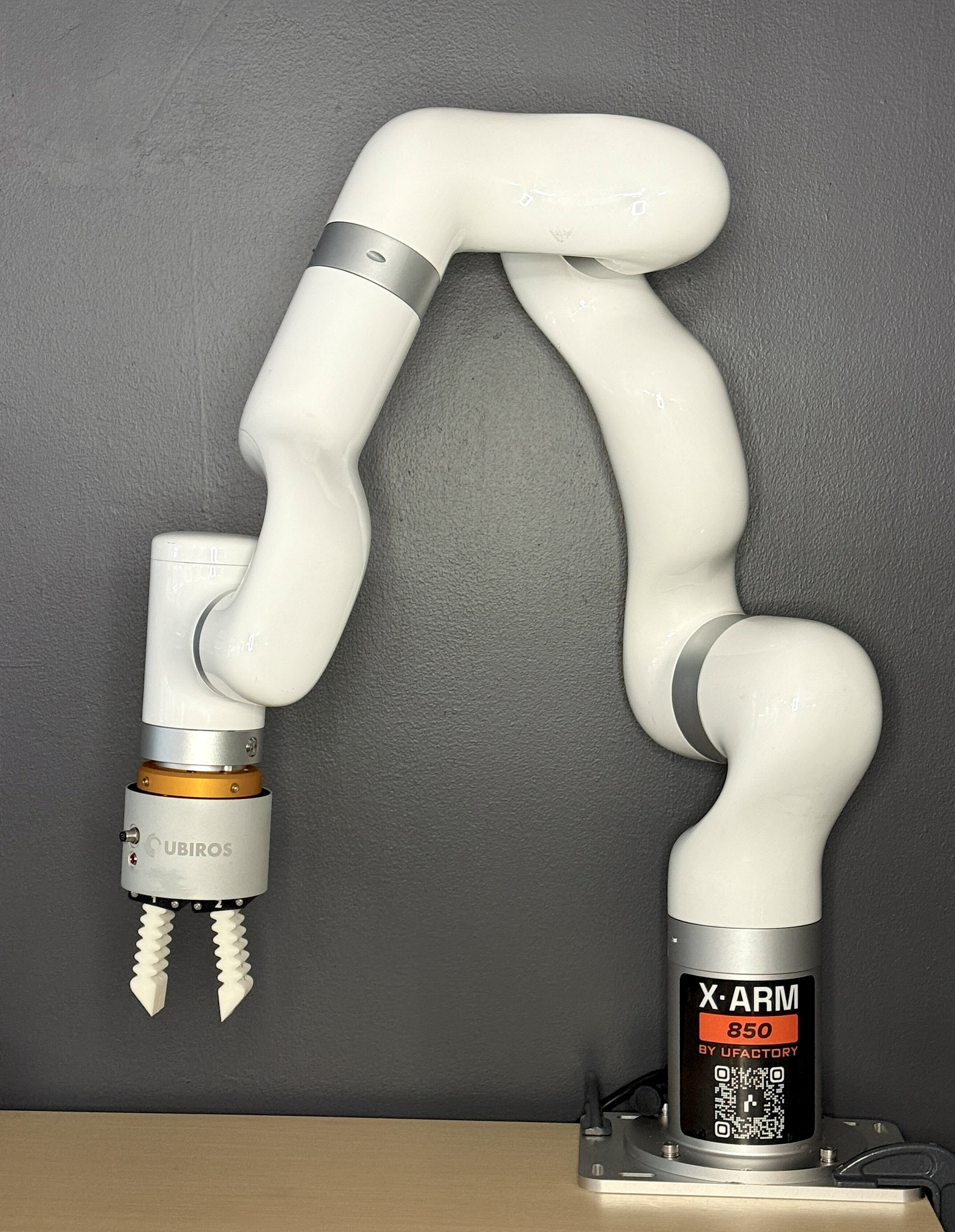
Hardware Requirements
- Robotic Arm: UFACTORY- 850, xArm series (version 1305)
- Soft Robotic Gripper: UBIROS - Gentle Duo Touch
Hardware Connection
Robotic Arm End Effector Definition
- Plug in Connection
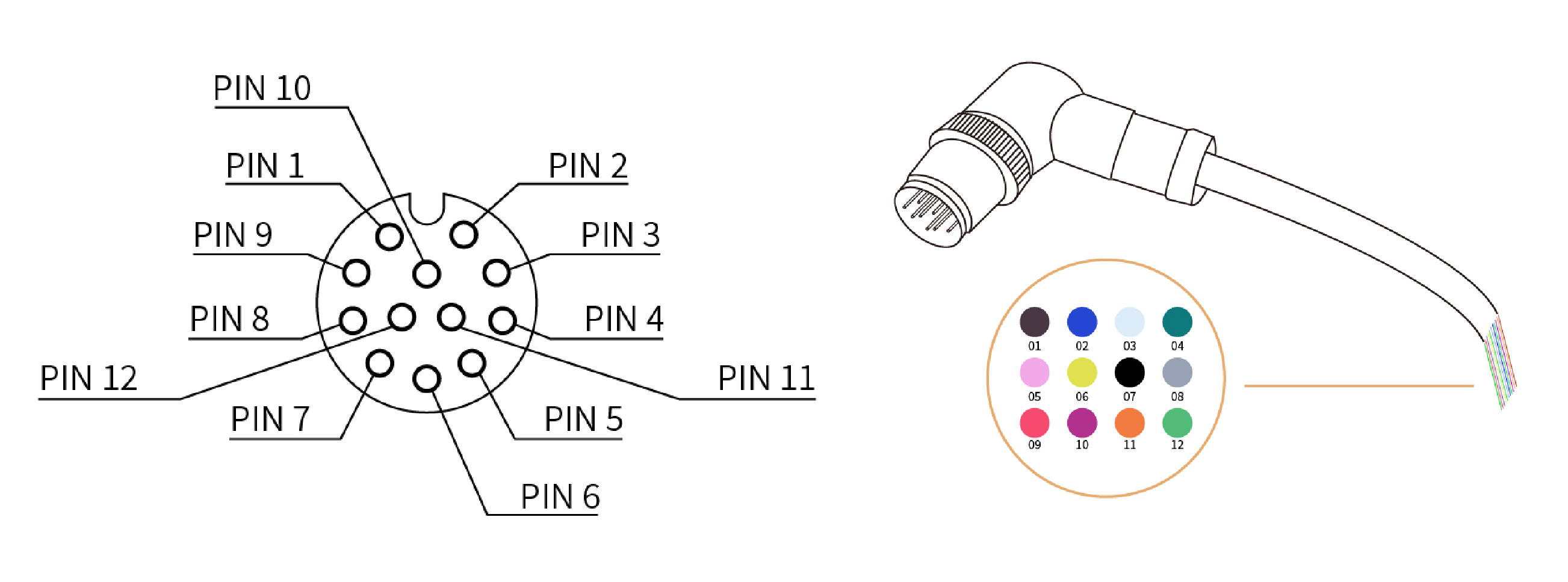
| Pin | Color | Signal | Pin | Color | Signal |
|---|---|---|---|---|---|
| 1 | Brown | +24V (Power) | 7 | Black | Tool Output 0 (TO0) |
| 2 | Blue | +24V (Power) | 8 | Gray | Tool Output 1 (TO1) |
| 3 | White | 0V (GND) | 9 | Red | Tool Input 0 (TI0) |
| 4 | Green | 0V (GND) | 10 | Purple | Tool Input 1 (TI1) |
| 5 | Pink | User 485-A | 11 | Orange | Analog Input 0 (AI0) |
| 6 | Yellow | User 485-B | 12 | Light Green | Analog Input 1 (AI1) |
GNT2508 Gentle Duo Soft Gripper
| Pin | Color | Signal |
|---|---|---|
| 1 | Grey | +24V (Power) |
| 2 | Hot Pink | 0V (GND) |
| 3 | Pink | Digital Input 1 (DI1) |
| 4 | Blue | Digital Input 2 (DI2) |
| 5 | Green | Digital Output (DO) |
Connections
| Connection | UFactory Signal | UBIROS Signal |
|---|---|---|
| 1 | Brown + Blue +24V | Gray +24V |
| 2 | White 0V (GND) | Hot Pink 0V (GND) |
| 3 | Black Tool Output 0 (TO0) | Pink Digital Input 1 (DI1) |
| 4 | Gray Tool Output 1 (TO1) | Blue Digital Input 2 (DI2) |
| 5 | Purple Tool Input 1 (TI1) | Green Digital Output (DO) |
1. Set up Soft Gripper
Connect to the gripper via Wifi. The network name will be the serial number, and the password will be 'GentleUbiros'. Navigate to the gripper IP Address- it should be 192.168.4.1. Select the 'Configure WiFi' button, find your local network, and connect.
2. Find the Gripper IP Address
Log in to your Wifi router. The address may be different for each router, but should be something like 192.168.0.1 or 192.168.1.1; input the password on the back of your router. Navigate to your devices page and locate the Gentle Duo Touch gripper by its serial number. Under the settings of the gripper, you'll find the IPv4 Address: 192.168.1.xxx. Take note of this address.
3. Add UBIROS Class to Python SDK
Add a new folder in the Python SDK and title it UBIROS. Add this code to a file titled ubiros_control.py.
# xArm-Python-SDK/ubiros/ubiros_control.py
import socket
import time
from typing import Optional

class UbirosGripper:
    """
    High-level wrapper for UBIROS Gentle two-finger grippers.
    Supports commands for fingers A and B, presets, offsets, sensing,
    velocity/i/k parameters, EEPROM saving, WiFi reset, etc.
    """

    def __init__(self, ip_address: str, port: int = 88,
                 timeout: float = 2.0, add_newline: bool = False,
                 read_reply: bool = False):
        self.ip = ip_address
        self.port = port
        self.timeout = timeout
        self.add_newline = add_newline
        self.read_reply = read_reply
        self._sock: Optional[socket.socket] = None

    # ---------------- CONNECTION MGMT ----------------
    def connect(self):
        if self._sock:
            return
        print(f"Connecting to UBIROS gripper at {self.ip}:{self.port} ...")
        s = socket.create_connection((self.ip, self.port), timeout=self.timeout)
        s.settimeout(self.timeout)
        time.sleep(0.15)
        self._sock = s
        print("Connected.")

    def disconnect(self):
        if self._sock:
            try:
                self._sock.close()
            finally:
                self._sock = None
                print("Disconnected.")

    def __enter__(self):
        self.connect()
        return self

    def __exit__(self, exc_t, exc_v, exc_tb):
        self.disconnect()

    # ---------------- LOW-LEVEL SEND ----------------
    def _send(self, body: str):
        if not self._sock:
            raise RuntimeError("Not connected. Call connect() first.")

        suffix = ">\n" if self.add_newline else ">"
        payload = (body + suffix).encode()

        self._sock.sendall(payload)
        if self.read_reply:
            try:
                return self._sock.recv(1024)
            except socket.timeout:
                return None
        return None

    # ---------------- COMMANDS ----------------

    # 1–2. Move individual fingers: "a60>", "b45>"
    def finger(self, finger_id: str, position: int):
        if finger_id not in ("a", "b"):
            raise ValueError("finger_id must be 'a' or 'b' for 2-finger gripper")
        self._validate_pos(position)
        return self._send(f"{finger_id}{position}")

    # 3. Read current position: "a?" or "b?"
    def finger_position(self, finger_id: str):
        if finger_id not in ("a", "b"):
            raise ValueError("finger_id must be 'a' or 'b'")
        return self._send(f"{finger_id}?")

    # Combined commands: e.g., "a12>b12>"
    def combined(self, command_string: str):
        """
        Example:
            combined("a12>b12>")
        """
        if not command_string.endswith(">"):
            raise ValueError("Combined command must end with '>'")
        # Strip trailing > because _send() adds its own
        return self._send(command_string.rstrip(">"))

    # 4. Move both fingers: "m55>"
    def move_all(self, position: int):
        self._validate_pos(position)
        return self._send(f"m{position}")

    # Friendly helpers
    def open(self):
        return self.move_all(0)   # moderate open

    def close(self):
        return self.move_all(65)    # full close

    # 5. Set preset: "p1:65>"
    def set_preset(self, slot: int, position: int):
        self._validate_slot(slot)
        self._validate_pos(position)
        return self._send(f"p{slot}:{position}")

    # 6. Save Position N to EEPROM: "s1>"
    def save_preset(self, slot: int):
        self._validate_slot(slot)
        return self._send(f"s{slot}")

    # 7. Save all parameters: "s>"
    def save_all(self):
        return self._send("s")

    # 8. Go to preset: "g1>", "g2>", etc.
    def go_preset(self, slot: int):
        self._validate_slot(slot)
        return self._send(f"g{slot}")

    # 9. Adjust finger offset: "o1:-5>", "o2:7>"
    def set_offset(self, finger_number: int, offset: int):
        if finger_number not in (1, 2):
            raise ValueError("finger_number must be 1 or 2 for 2-finger gripper")
        return self._send(f"o{finger_number}:{offset}")

    # 10. Set current limit: "l2500>"
    def set_current_limit(self, milliamps: int):
        return self._send(f"l{milliamps}")

    # 11. Read current limit: "l?"
    def read_current_limit(self):
        return self._send("l?")

    # 12. Set confirmation threshold: "t600>"
    def set_threshold(self, milliamps: int):
        return self._send(f"t{milliamps}")

    # 13. Read load current: "f?"
    def read_load_current(self):
        return self._send("f?")

    # 14. Read or set position control coefficient: "k?" / "k87>"
    def read_k(self):
        return self._send("k?")

    def set_k(self, value: int):
        return self._send(f"k{value}")

    # 15. Read or set maximum velocity: "v?" / "v65>"
    def read_velocity(self):
        return self._send("v?")

    def set_velocity(self, value: int):
        return self._send(f"v{value}")

    # 16. Read or set current-control coefficient: "i?" / "i79>"
    def read_i(self):
        return self._send("i?")

    def set_i(self, value: int):
        return self._send(f"i{value}")

    # 17. Reset Wi-Fi: "x>"
    def wifi_reset(self):
        """
        Forces the gripper into AP mode again.
        You must reconfigure Wi-Fi after this call!
        """
        return self._send("x")

    # ---------------- VALIDATION ----------------
    @staticmethod
    def _validate_pos(pos: int):
        if not (0 <= pos <= 100):
            raise ValueError("Position must be 0–100 percent")

    @staticmethod
    def _validate_slot(slot: int):
        if slot not in (1, 2, 3, 4):
            raise ValueError("Preset slot must be 1,2,3,4")
4. Control Gripper with Arm
Example code:
gripper_ip = "192.168.1.xxx" ###TODO: Replace with your gripper IP
speed=55

with UbirosGripper(gripper_ip, read_reply=True, add_newline=False) as grip:
    grip.open()                 # m0>
    time.sleep(0.1)
    grip.set_preset(1, 30)      # p1:30>
    grip.go_preset(1)           # g1>
    time.sleep(0.1)
    grip.close()                # m65>
Note that the gripper IP has to be edited.