How to solve S17 error?
S17: Single-turn Encoder Error
Product: xArm series, UF 850, Lite6
UFactory version: V2.4.0+
Status code=16
Lite6, xArm ≤1303 version
Code:S17 , Joint ID: *(can be 1~7) , status code:16 , (only for Lite6) servo version < 4.0.18.
- press down the E-stop button and then release.
- Enter 'Settings-General-Debugging Tools-Joing', send
H101 D0104 V1 I*to unlock joint*, manually move joint* a little bit (Note: For Lite6, it is recommended to rotate joints 4, 5, or 6 by at least 45°), and then sendH101D0813V2I*, press down E-stop button. (This step will reset the zero position, so you need to mark the zero position of joint* before moving) - release the E-stop button, move Joint* to the zero position, send
D13 I*, press down E-stop button. - Try to enable the robot again.
850,Lite6, xArm ≥1304 version
Code:S17 , Joint ID: *(can be 1~7) , status code:16, (only for Lite6, xArm1304) servo version ≥ 4.0.18
- press down the E-stop button and then release.
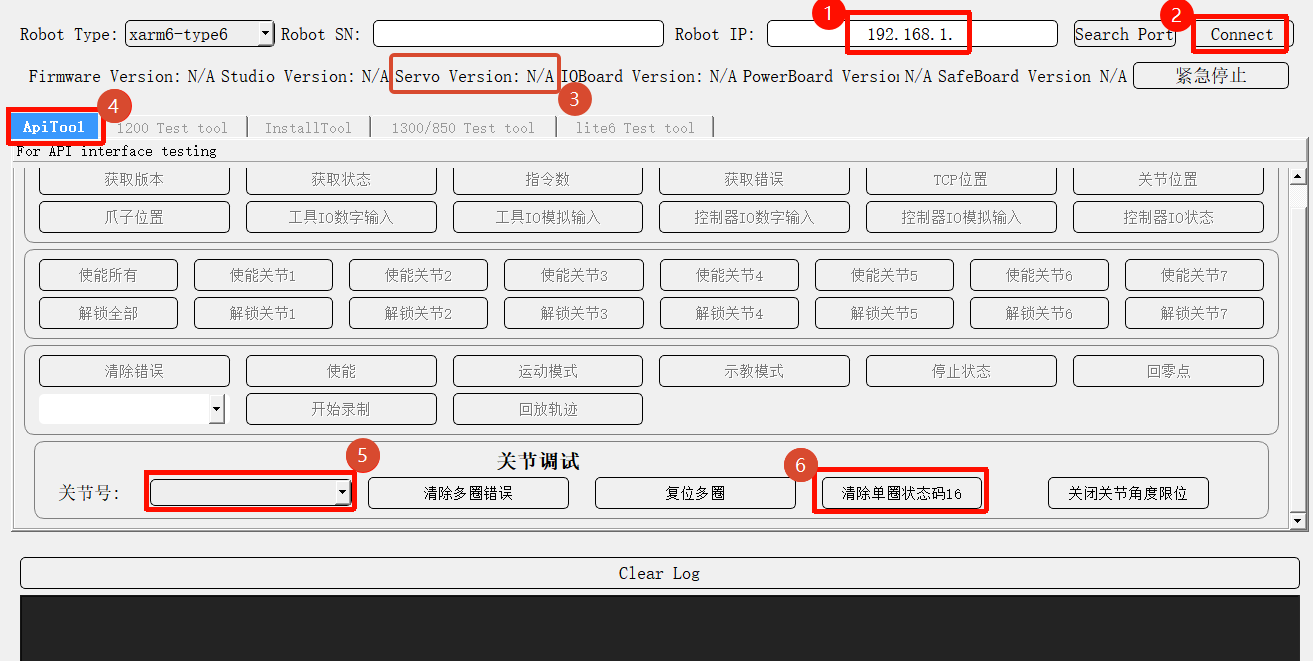
- Download and launch xarm-tool-gui, Enter the controller IP address and click Connect.
- (only for Lite6, xArm1304; skip this step for other version) check the servo version is ≥ 4.0.18.
- If version < 4.0.14: Contact UFACTORY Technical Support for an update.
- If 4.0.14 ≤ version ≤ 4.0.18: follow the guide to update the firmware. Reference: How to update the joint firmware? | UFactory Docs
- Switch to the ApiTool tab, select the faulty Joint ID, and click Clear Single-turn Status Code 16.
- Press the Emergency Stop (E-Stop) button, wait for 5 seconds, then release it. Try to enable the robotic arm again.